
Log In
Sign Up  

"Calendar Freedom"

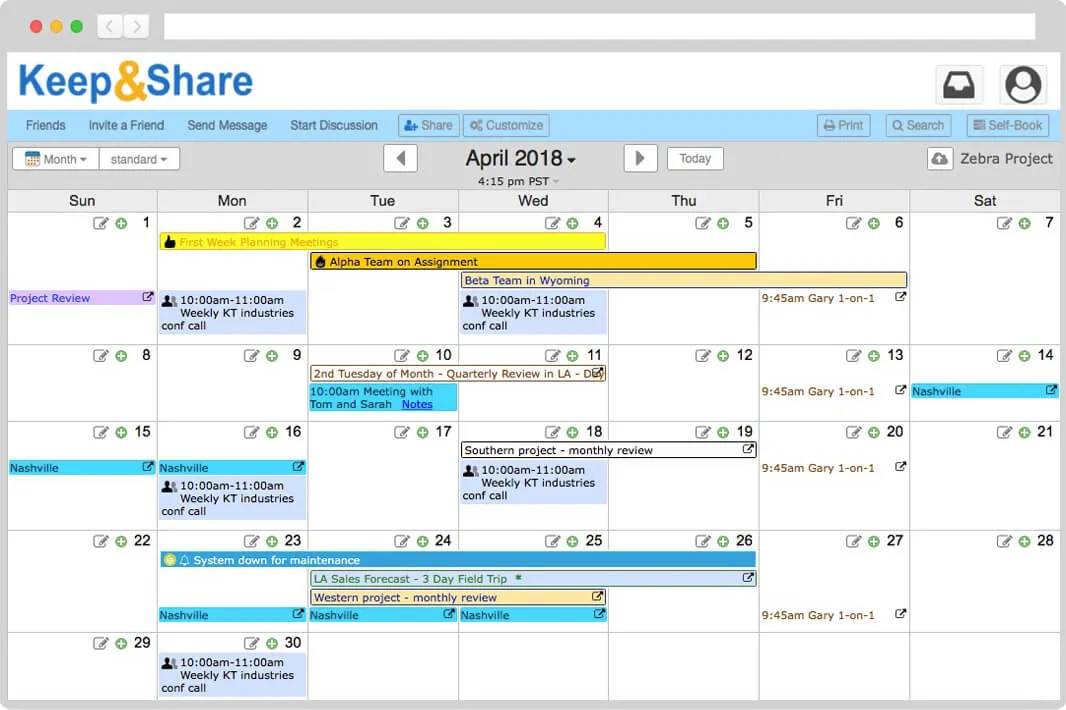
Each day box of KeepandShare's calendar has a small, simple built-in word processor with formatting.

This gives you complete freedom to just "click and type" anywhere to add detailed notes.

Free Online Calendars

A great, dead simple, online calendar you can use right in your web browser. View & print by year, month, week or day, with national holidays.


Go to Online Calendar


  • Easy-to-use: just click and type!
  • Keep your schedule online: accessible from any computer or smart phone. When you share the calendar, others always see the up-to-date online version.
  • Multiple calendars, multiple users: allow each user to see and edit just the calendars you want.
  • Powerful events: schedule events & appointments & receive automatic reminders.

Easy Online Calendar

One-click Simplicity

As easy-to-use as a wall calendar: just click and type!

One Version

Keep your schedule online where it is accessible from any computer. When you share the calendar, others always see the up-to-date version.

Powerful Viewing

View your calendar in month, week, day or event view.

Computer Power

Repeating events and flexible online calendar overlays and many more advanced calendaring features.

Strong Privacy: Control Who Sees Which Calendars

You control the list of who can view and edit each calendar in your account. Keep your company's events schedule fully public, while keeping the office staff schedule viewable only by employees, and keeping your personal calendar entirely private to yourself.

Mobile

A free mobile version of KeepandShare works great on iPhones, iPads, BlackBerry and Android phones, so you can access your calendar whereever you are.

Email Reminders

Receive reminders by email before your event - choose whether the reminder comes 1 hour or up to 7 days prior.

Group Emails

Send events and calendars by email to your group. Copy event reminders to your group so everyone is reminded of a key event.

Automatic Notifications

Automatic notifications of edits by others are sent to you and your group.

Receive Your Daily Calendar by Email

You and your team can receive a daily copy of today's calendar by email.

PDF Printing

Print your calendar in 5 beautifully formatted PDF formats. Print immediately or save as a PDF file.

Word Processor in Every Day

Unlimited word processing text and formatting in each day.

Calendar Icons

Add colorful calendar icons to any event or day.

Add Pictures

Insert and size photos to any day in your calendar.
Link directly to details by putting live hyperlinks in your day text or on any repeating event.

Share Calendars Privately with Anyone

Your friends do not need to sign up -- you can share by just pasting email address(es). They are emailed a secure link and password. They don't need a KeepandShare account.

Color Code

Assign different colors to events and overlays so your calendar is easy to scan and understand.

Add in Overlays

View combined calendars using 'overlays'. Add a variety of national & religious holidays overlays. Subscribe to Google Calendar or other online calendars using 'iCalendar' feeds.

No Software

No software to install. Your account is instantly available from any web browser.

Easy

Completely easy and free. Online calendars don't have to be hard-to-use.

Publish Public Schedules

Embed your calendar on your website to publish public schedules. Learn more.

Keep Everyone In Synch

Put your calendar online where everyone will see the same exact schedule. Create a free KeepandShare account and then just type to enter information. Set the calendar to be completely public or keep it private to just yourself - you always control who sees what.

The world's easiest free online calendar. KeepandShare's beautifully designed and simple to use interface makes your scheduling easy and eliminates scheduling conflicts.

Multiple users and automatic notifications. When you share your account's calendar online with others, multiple users can view and edit the online calendar at the same time. They will always see the same version. Each member is automatically notified whenever there are new calendar updates. Calendar sharing is as easy as entering the email address of the person you want to share with - they do not need their own account!

Integrate the calendar into your website. KeepandShare's free online calendars can be embedded into your existing website so members can see their schedules without ever leaving your site. Calendars can be easily customized to fit the color and layout of your site.

Keeping your schedule up-to-date has never been easier. This free online calendar allows unlimited text in each day box, so it's ideal for easily noting down details on your day's tasks, meetings or keeping a journal. Each account can include up to 30 separate online calendars, so use a KeepandShare online calendar for each area of your life - one calendar for work, and other ones for home, exercise or garden journal, kid's school schedule, etc. Idea for work calendars such as lesson plan calendar, staff rotations, manager-employee schedule tracking, etc.

The web's best calendar printing. Only KeepandShare gives you gorgeous, on-demand PDF-based calendar printing of your calendar in either day, week or month views. Make your own calendar or print your own calendar online now.

Switch from Your Current Calendar

KeepandShare provides excellent calendar import and export, so you can easily export your current calendar's data in the industry-standard .ICS format and bring it into KeepandShare's online calendar in seconds using our calendar import command.

It seems like the big companies like Google, Yahoo and Microsoft are always changing their software without listening to customers. They don't even provide technical support. If you are looking for alternatives to Google Calendar, or a way to switch from Yahoo Calendar after it's recent loss of functionality, or a better alternative than Microsoft Outlook & Microsoft Schedule, come to the easy-to-use KeepandShare calendar.